|
9/18/2020 0 Comments Top 7 Tasks to Outsource to A VA How many of you have started your businesses but gotten stuck or overwhelmed with all of the set up, marketing and general day to day admin tasks? You are not alone my dear, dear friend.
It's easy to get your head spinning. I've helped many business owners launch, grow, and scale their businesses. There's no need to get bogged down or caught up into thinking that you have to go it alone. Hiring a virtual assistant is all it takes to free up your time so you can focus on more important things like growing your business. Here are my top 7 jobs that you can outsource. First things first...What is a virtual assistant? In case you’re new here, I wanted to cover what a Virtual Assistant actually is. There is no cut and dry description. At Presto Virtual Assistance Services, a (VA) is any type of remote assistant who provides administrative, creative, or technical support services for online or brick-and-mortar business owners. There are so many things you can outsource to a VA, that sometimes it’s hard to choose where to start. As promised, here are my top 7 jobs to outsource to a VA. #1 - Data Entry; there are so many reasons why you should outsource data entry projects to a VA. One of the benefits is to gain better use of your time. #2 - Email Management; This is HUGE and definitely one of the most popular jobs that is requested by my clients. It's one of the first things that many clients will hand off in their business. Your VA can organize, respond and filter emails. If you're using advanced systems such as HelpScout, your VA can answer your customer service emails, create templates and automatic replies. There is even a tag feature to track and monitor different types of emails, subjects, actions and more. There is so much you can get done simply by outsourcing email management. #3- Calendar Management; By using tools like Calendly or Acuity, a VA can book appointments for you without having to email back and forth. However, sometimes, that's necessary too. You may want your VA to provide you with a daily report of what's on your to-do list or meetings you have booked for that day. If you work with a team and need multiple users to view the same calendar, I would highly recommend Team\Up. Plan upcoming blog posts, events, conferences and more. #4- Facebook Page Management; When you need somebody to post content, respond to messages and comments, a VA can help you with this too. This task can include posting a few times a day, content creating ad what graphics or images will be used. It could also simply be giving you prompts so that you can create the post yourself. Maybe you already have posts and you just need someone to schedule them for you. Page management can mean so many different things and can be very time consuming. It is definitely a job that can be outsourced to a VA. #5- Facebook Group Management; On the best of days, managing a Facebook group can often be very time consuming for the avid business owner. Many business owners don't have the energy to actively admin their own groups. As an admin for your group, the VA's goat is to take some work off your plate. Things like responding to comments and posting inside of the group, process member requests or create events. Tasks that would otherwise take up a good chunk of your time. These are all pretty intensive tasks but are very essential to grow your Facebook group and make sure it remains healthy and keeps its purpose. #6- Graphic Design; I'm a creative at heart and I love using Canva to create beautiful graphics for my clients. With this tool, your VA can create logos, social media graphics, Pinterest pins, branding boards, templates and much more! #7- Visibility and Outreach; What does this mean? Simply put, it means that you want to get eyes on your business and to get your business known. One way a VA can help with this is to get you on podcasts that are a good fit for your business. Whatever it is that you need help with, a VA can be a God send. Trust me, there's more to running a successful business and it's impossible to know or do all things. Hiring a Virtual Assistant is the first thing standing between you and success! Book a complimentary call today. Your freedom is waiting.
0 Comments
 Every business needs a Facebook fan page; it's a great way to interact with both customers and potential customers in a place where many of us spend way too much of our time. The question is, how do you grow this page beyond the initial wave of likes you get from your friends and relatives? And how can you ensure the likes you do get match your audience so the exact right people see your posts, interact with your page and visit your site?
Unlike with TV or Newspaper or any other classic form of advertising, Facebook enables very specific targeting. If you want to just reach people between the ages of 25 and 60 in the three zip codes nearest you, you can do that. If you'd like to reach only people who like Die Hard or When Harry Met Sally, you can also do that. Here are the basics Facebook ads can be used for a variety of marketing goals: to get more visitors to your site, to drive sales, to get social posts in front of more people, to re-target people who've previously visited your website or to gain likes for your business page (among other options). Each goal has a generally expected cost attached to it, based on how difficult is to for that goal to be achieved. An ad whose goal is to lead directly to a sale will be more expensive than an ad whose goal is just to get someone to see a post, since you'll make a direct profit from the first while the second provides an indirect value. Generally costs come out to an average of around $0.20 per like (for a campaign to get more people to like your business page) or $0.28 per click (in a campaign to get more visitors to your site). Keep in mind that these average costs are brought down by large companies with efficient marketing departments; your own costs will vary depending on the quality and effectiveness of your advertising message. A great thing about FB advertising is you can set a daily budget, whether it's $1.00 a day or $100 a day (or more) that ensures you never spend more than you can afford. And that ensures you can test your marketing out before you start pouring money into it. Want to get started? Follow & like Presto Virtual on FB for more tips. Select and click categories below for more tips and valuable information.  With summer drawing to a close, now is the time to focus on growing your business. Fall is the perfect time to re-energize and recharge. One of the pitfalls I often see so many business executives fall into, is thinking too small, doing the same old things they have done for many years, directed at the same customer base. Now is the time to have a new brainstorming session with your staff and get some new ideas flowing... think big! Set your goals high, try a new approach and you may be surprised at the levels you can reach. Why do I say think big? Let's face it-- it's as |simple to find a more profitable client as it is to find a low-paying one, so why not focus on going? The key is generally to know what you have to offer in terms of solutions, communicate that clearly to the right prospective client, and bingo- - you're on your way to up-levelling your client base. Ask for referrals, recommendations, testimonials and endorsements from formerly super satisfied clientele and your task of obtaining those high level clients will get easier and easier. Here are 10 additional ways to be attract and retain high paying clients.
If you found this article valuable and helpful, please take a moment to share or comment. Thank you. 3/15/2019 0 Comments Twitter For Business Why is Twitter great for your business? It's very simple! Twitter prides itself on being able to share bite sized chunks of content/valuable information, meaning that you don't lose customers/readers due to super long content. It works well with the lessening attention spans of many people. You are able to interact with others in the business world to learn from them and follow other businesses that are in your industry and gain connections that may push your business to more profit. Another benefit is the ability to show your worth to those who would be interested in hiring you. For example, potential clients will be able to see what you're capable of and will know what to expect from your skill set. This positions you as a source of knowledge and allows clients more in depth examples of your ability to benefit them as a person and as a business. You can establish yourself as an industry leader and since the lifetime of tweets are almost indefinite, you can be found by using relevant hashtags and through the search feature. Using hashtags is a very useful ability Twitter has made and can make your business just that much more relatable to others searching for what you provide. Yes, Twitter is worth it and you can and will create a name for yourself by learning strategies for your business that will position it to become more well known and popular. Follow us: 3/13/2019 0 Comments The Right Tools For The Right Job When you first begin, it's easy to get by with "that's good enough for now" gear: an old PC or scratch pad, a corner of the dining room table. Try not to do that! These tools don't enable you to be dynamic and to expand. As you get busier with an ever increasing number of customers, your string and bubblegum set up will crumble like the walls of Jericho. Having the correct tools will make you increasingly more proficient, more productive and, believe it or not, happier. Hardware and software are not very expensive nowadays – so get everything you need set up right from the start. Among the tools you'll need are a good reliable PC, time tracking software, a project management system, a printer, scanner, email, calendar, anti-virus software, a password manager, video conferencing software, and a tool for screen sharing. Furthermore, those are just a few tools needed to maintain your own business. To assist your customers with running theirs, you'll also need a PDF editor, MS Office (Word, Excel and PowerPoint), and a graphics editor, along with the occasional custom tool for regular and important customers. (Guru tip: Keep close track of any tools that have month to month membership fees. It's easy to stop utilizing these when a project ends and unknowingly continue paying for several additional months!) Follow us;  Brand New ebook Design Tool Is A Total Game Changer - Create an eBook, free report, whitepaper & more. It doesn't get any easier than this. Crank out eBooks for in just seconds from now. Check it out, before the price goes up! Click here or on this image to find out more.  A Virtual Assistant Can Do So Much More For You Than Just Type! A Virtual Assistant can offer so many skills to a partnership with any business owner that many are often overlooked. Many entrepreneurs understand how Virtual Assistants can assist with basic secretarial jobs such as word processing, editing, proofreading and formatting of documents, but don’t realize that there are so many other things a Virtual Assistant can assist them with. When the time comes to grow your business, partnering with a virtual assistant can be one of the most beneficial, life changing steps that you can take on the path to your entrepreneurial success. A well-matched virtual assistant should be like a business partner who is invested in the success of your business. Investing in the proper systems and making time for the on-boarding process can be the key to accomplishing your business goals. When you prepare and invest in the partnership with your virtual assistant, it can be like joining forces, increasing your productivity by more than 50%. When done properly, this can quickly launch your business to the next level. To get started leveling up in your business, read on for my 5 steps to preparing for a successful virtual assistant partnership. 1. Create a List of Tasks to Delegate During your initial consultation, you’ve probably already discussed your needs with your virtual assistant but it’s important to keep the task list up-to-date for easy reference for both of you as you begin to assign tasks. Even if you’re only beginning with one or two tasks, it’s helpful to provide your virtual assistant with an idea of what else may be coming down the pipeline later. A good virtual assistant will keep this list of tasks organized in a project management system so nothing falls through the cracks. Still not sure what tasks you can outsource? Get my free list "30 Tasks to Delegate to a VA To Grow Your Business" 2. Organize your Systems and Workflow Before kicking off work with your first virtual assistant, make note of your repetitious tasks, or the projects where you know you’re falling short, and document the “how to” steps so that your virtual assistant can take over those tasks for you. When making your list, ask yourself these questions. Can most of the tasks be assigned on a recurring daily, weekly, or monthly basis? How often will you require reporting and updates on these tasks? What other tasks can you take off your to-do list immediately? 3. Create Clear Instructions When you plan to walk through the assignments, whether by telephone, Skype or email, setting out clear instructions will ensure that your virtual assistant knows exactly what you are looking for. The less that your virtual assistant has to read between the lines, the more that they’ll be able to hit the ground running. The more detail that you can provide, the less room there will be for error and confusion. Once my clients have explained a task or project to me, I like to follow up with an email outline of our call to verify that I understood exactly what they were looking for. 4. Set Expectations Clarify deadlines, urgency, and priorities so that your virtual assistant can start to see the big picture and learn to share your vision for your business. If you require quick turn around time, or expect your assistant to be able to return emails or take phone calls on short notice, verbalize those expectations so that everyone is on the same page. A good virtual assistant wants to be available to meet your needs when you need them the most. Establish your preferred form of communication; email is a critical tool when it comes to virtual work, but if you have other communication preferences, particularly for urgent matters, your virtual assistant will want to know the best way to reach you and vice versa. Some clients like the phone, some like to use apps like Slack, and some people prefer text message or emails. Every person is different, as a virtual assistant I find it essential to communicate with my clients in whatever mode works best for them. 5. Provide Feedback At the beginning of your partnership, it will be important to check-in with your virtual assistant to give them feedback about the work that they’ve produced. Constructive feedback of what you’d like adjusted and confirmation of what’s exactly on track is extremely helpful to your virtual assistant as they start to learn the ropes of your business practices and culture. Delegating projects to a virtual assistant you can trust is a key step in freeing up your time and growing your business. Preparation is the key to kicking of that relationship; it will take a bit of time for your virtual assistant to acquire the knowledge that you hold in your head and in your habits. When you and your virtual assistant follow this partnership structure, you’re sure to have a smooth on-boarding process and a successful partnership that will take you and your business to the next level of success. 11/25/2018 0 Comments New eBook Design Tool! This brand new ebook design tool is a total game changer! Have you ever tried to create an eBook, free report, whitepaper and thought, “there MUST be an easier way to do all this?” Me too, and I spent YEARS searching for it, without any joy. Today, that all changes. Here’s a brand-new tool that allows you to crank out eBooks (or any type of PDF) for business or pleasure, in just seconds from now. Yep, we’re talking everything: — Instant content — Instant design — Instant formatting — Tons of flexibility and customization All for the price of a few nasty coffees. Check it out, before the price goes up! Grab Sqribble, this year’s hottest eBook design tool. Create your own ebooks in minutes and save weeks of frustration. Great for customer downloads to grow your email list, courses and more. Learn more about Sqribble here. 11/6/2018 0 Comments 3 Top Tips For Font Pairing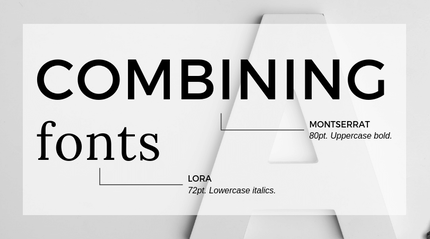 Great font pairings are essential to great design. But picking great fonts can seem like a dark art. Choosing one font is simple enough, yet finding another font to complement it can be a journey to Helvetica and back. But it doesn’t need to be a nightmare. Here are 3 top tips for font pairing. 1. Stick to two fonts In the world of design, simplicity is best, and this is especially true when dealing with fonts. Too many fonts can look messy, so keep it simple by just using two. Give each font a specific role in your design – for instance, one font for headings, and another for the body copy. 2. What does your font say? Keep it legible. If you want to get your message across, ensure your typeface is a suitable size and is fit for purpose – playful fonts might be suitable for a heading, but not for body text. And keep in mind that every font has its own personality – playful, formal, modern, traditional… so ensure you use fonts that will support the message of your text. 3. Opposites attract If there’s one foolproof font pairing that we’ll always stand by, it’s this: a sans serif font with a serif font. You can use opposites when playing around with script and feature fonts too, by pairing them with a more restrained font. ***Awesome, you read the entire post! Hope you liked it. Why not share this Informative and valuable content? Much appreciated. Thank you. ****  3 Simple Steps To Grow Your E-Mail List 3 Simple Steps To Grow Your E-Mail List
Look, I know there’s nothing worse than putting in endless hours of dedication, time- and probably a bit of sacrifice-and then all you hear back is…crickets. I tried doing all the things for far too long, and if you have too, then you
probably know just how overwhelming and exhausting it can be... I’ve been helping clients grow their businesses for over a decade and it’s been incredible to see first hand what happens when we truly grasp our potential, stop limiting ourselves, take action, and go after what we want.Here are 3 Simple Secrets to help you put together a FAB Free Offer for your website and start building your list of Raving Fans. The first thing is to find out what your ideal client wants and the easiest way to do this is ask them. If you have a list, create a quick survey in Survey Monkey and send it to them. If you don’t have a list, look at what leaders in your field are doing and create something similar and put your spin on it. Be authentic! �Solve your ideal client problems or give advice.
Follow on IG for tips, inspiration and free resources. |
CategoriesAll Business Topics Did You Know That? Google & SEO Inspiration & Motivation Quotes Quote Of The Day Social Media What Do You Think

Visit our blog for business tips & tools, motivational quotes, and resources
Francine A. AuthorWelcome to my Blog. Disclaimer: I am not an expert on the subjects posted on this blog and is merely sharing from either personal experience, articles or other networking sources. Content is intended only as useful tips and resources for business owners and all who visit this blog. Subjects will vary from time to time. NOTE: Some posts may contain affiliate links to products I really love and recommend, which means I may receive a small commission, at no extra cost to you. I will use the earnings to maintain this blog and business. Archives
March 2023
|

 RSS Feed

© PRESTO VIRTUAL ASSISTANCE SERVICES
Privacy Policy